
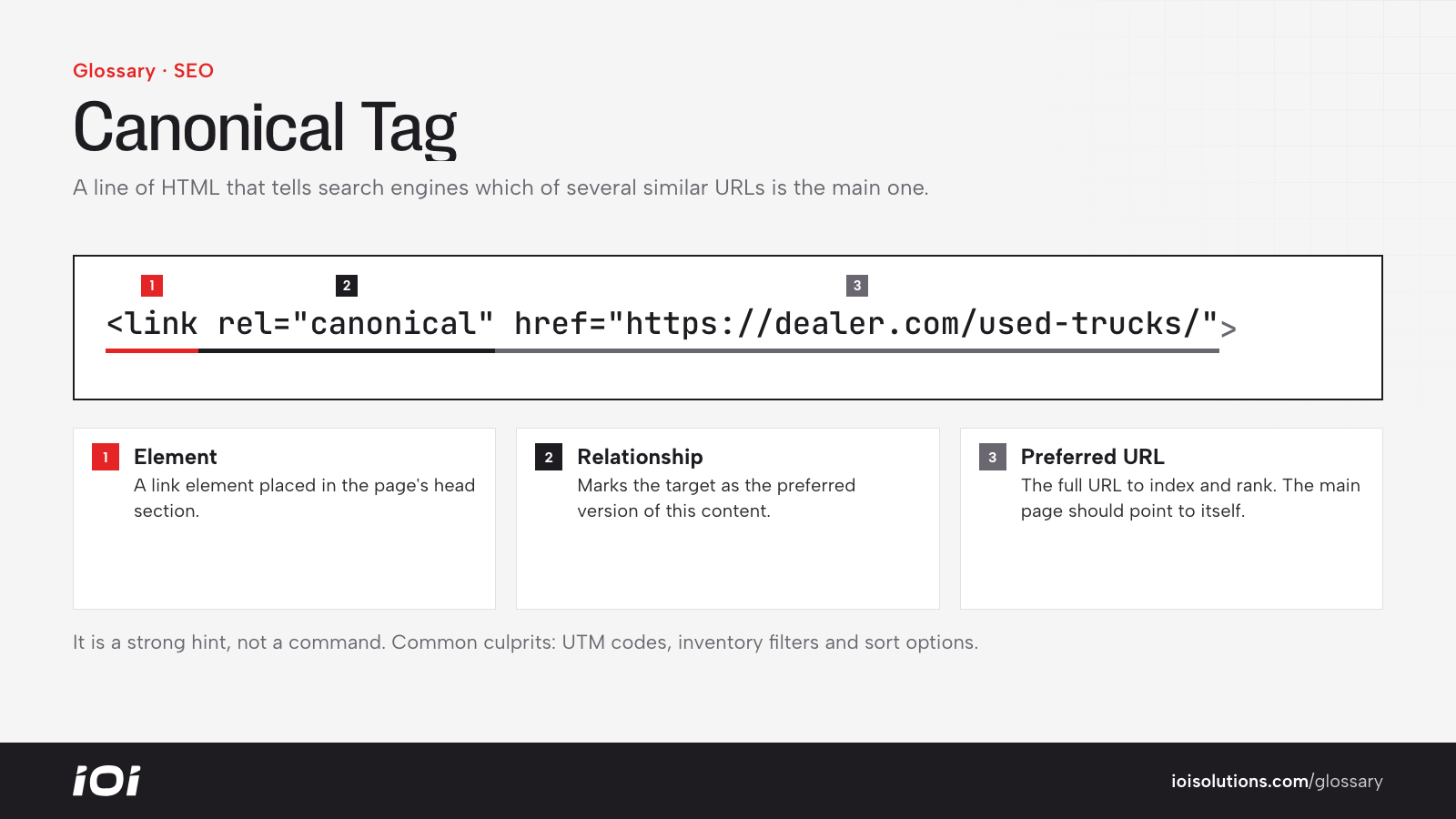
What Is a Canonical Tag?
A canonical tag is a snippet of HTML placed in the head section of a web page that points search engines to the preferred, or canonical, version of that page. It uses a link element with rel=”canonical” and the full preferred URL. It’s essentially a note saying, “If you find several versions of this content, this is the one to index and rank.”
Canonical tags were introduced to help sites manage duplicate and near-duplicate pages without blocking them from users.
Why Canonical Tags Matter
Websites often create multiple URLs for the same or very similar content without anyone intending to. When that happens, search engines must guess which version to show. Canonical tags help by:
- Consolidating ranking signals: Links and other signals pointing to the different versions can be combined toward the preferred page.
- Reducing duplicate content confusion: Search engines are less likely to show the wrong version or split visibility between versions.
- Using crawl effort efficiently: On large sites, it helps search engines focus on the pages that matter.
- Controlling what appears in results: You influence which URL shows up in search listings.
Keep in mind that a canonical tag is a strong hint, not a command. Search engines may choose a different canonical if other signals conflict.
How Canonical Tags Work
Common causes of duplicate URLs include:
- Tracking parameters such as UTM codes added to links.
- Sorting and filtering options that change the URL but not the core content.
- HTTP and HTTPS versions, or “www” and non-“www” versions, of the same page.
- Products reachable through several category paths.
- Printer-friendly pages or session IDs.
To fix this, each duplicate version includes a canonical tag pointing to the main URL. It’s also good practice for the main page to include a self-referencing canonical that points to itself. Canonical tags work alongside other tools: 301 redirects for pages that should no longer exist, and consistent internal linking that always points to the preferred URL.
Canonical Tags in Automotive Marketing
Automotive websites are especially prone to duplicate URLs because of inventory and catalog systems:
- Dealership inventory: Search results pages can generate thousands of URL variations from filters like make, model, price, color and sort order. Canonicals and careful indexing rules keep search engines focused on the most useful pages.
- Vehicle detail pages: The same vehicle may be reachable through several URLs, such as from different filters or campaigns. Each should point to one canonical vehicle page.
- Parts and accessories stores: A product that fits many vehicles may appear under multiple year/make/model category paths. Pointing all versions to one product URL consolidates its signals.
- Multi-location shops: Repair or collision groups with similar service pages for each location need genuinely unique local content, or they risk near-duplicates.
For example, an online parts store might have a cold air intake product appearing under three different truck categories. Setting one canonical product URL keeps search engines from treating them as competing pages.
Best Practices
- Use absolute URLs. Include the full address with protocol and domain in the canonical tag.
- Add self-referencing canonicals. Every indexable page should declare itself as canonical.
- Use one canonical per page. Multiple or conflicting tags can be ignored.
- Keep signals consistent. Internal links, sitemaps and redirects should all point to the canonical URL.
- Don’t canonicalize unrelated pages. Only point to pages with the same or very similar content.
- Audit regularly. Website platforms and plugins sometimes set canonicals incorrectly, so check them with a crawler or Search Console.