
What Is a Search Results Page (SRP)?
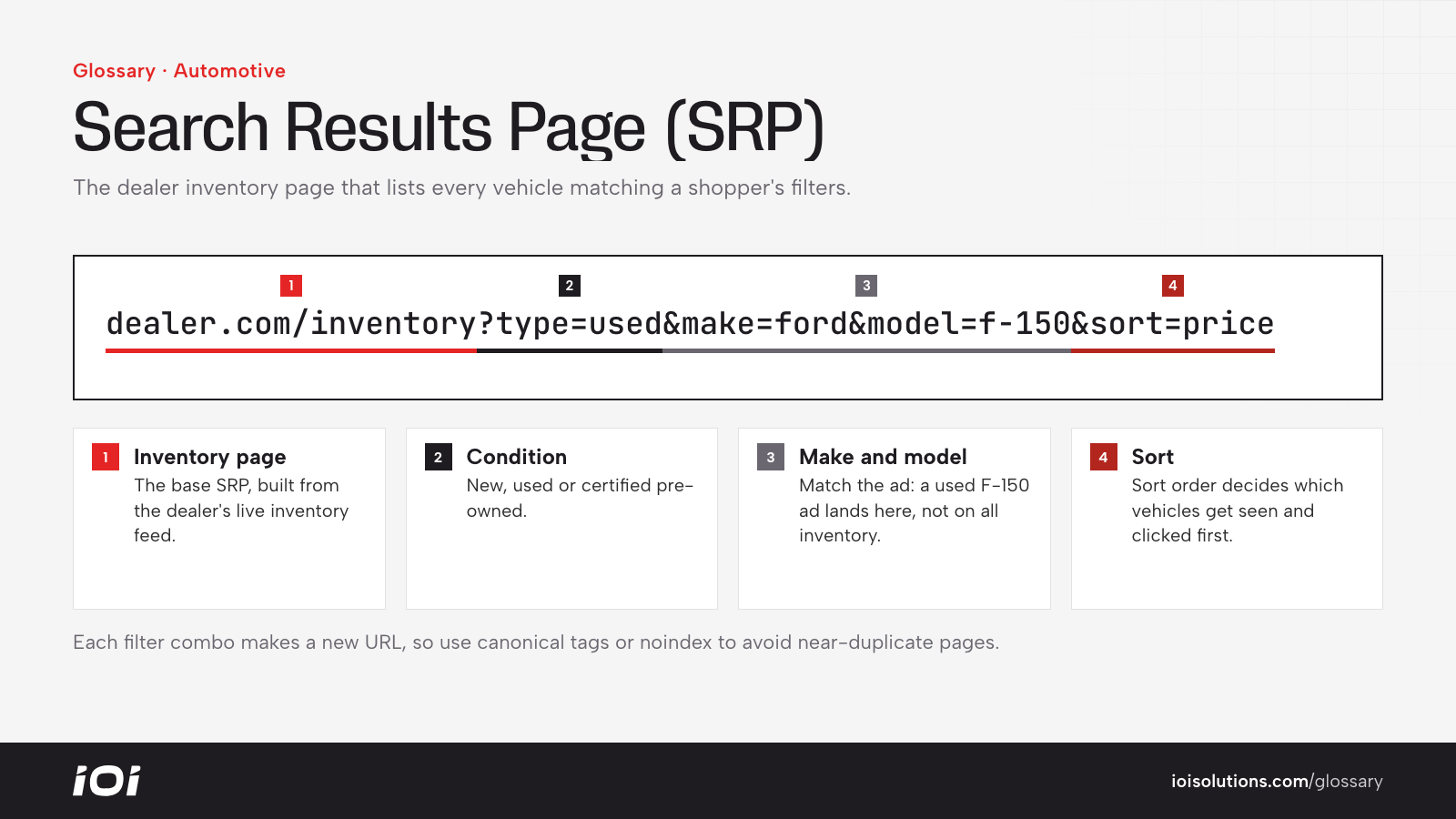
In automotive marketing, a Search Results Page (SRP) is the page on a dealer website or marketplace that displays a list or grid of vehicles matching a shopper’s search. Common examples are “New Inventory,” “Used SUVs Under $25,000” or “Certified Pre-Owned Trucks.” Each vehicle appears as a card with a photo, price, mileage and key details, linking to its Vehicle Detail Page (VDP).
The automotive SRP should not be confused with a search engine results page, usually called a SERP, which is the list of results Google or Bing shows for a query. Dealers use SRP to mean their own inventory search pages.
Why the SRP Matters
The SRP is where shoppers browse and narrow their options. It matters because:
- It shapes which vehicles get attention. Default sorting, filters and photo quality determine which units shoppers click.
- It is a common landing page. Paid search ads for model or category searches often send people to a filtered SRP.
- It affects engagement. A clunky, slow or confusing SRP increases bounce rates and lowers VDP views.
- It can rank in search. Well-built SRPs for categories like “used Honda Civic in [city]” can attract organic traffic because they stay live even as individual vehicles sell.
How an SRP Works
SRPs are generated dynamically from the dealer’s inventory feed. Shoppers can usually:
- Filter by condition, make, model, trim, year, price, mileage, body style, color, drivetrain, features and certification status.
- Sort by price, mileage, year or newest arrivals.
- Compare or save vehicles, and sometimes see estimated payments directly on the card.
Each filter combination may create a unique URL. That is helpful for linking ads to specific results, but can generate many near-duplicate pages, so search engines need guidance through canonical tags, noindex rules or curated landing pages.
How the SRP Affects Marketing
Marketers should treat SRPs as important landing pages, not just site navigation:
- Match ads to filtered SRPs. An ad for “used F-150 near me” should land on an SRP pre-filtered to used F-150s, not the full inventory page.
- Build SEO-friendly category SRPs. Key models and body styles can get static, indexable SRP versions with a short intro, location context and internal links.
- Watch the SRP-to-VDP click rate. If many visitors reach the SRP but few open a VDP, test photos, pricing display, sort order and mobile layout.
- Handle empty results. When filters return no matches, suggest similar vehicles or offer a “notify me” form instead of a dead end.
- Feature promotions carefully. Banners or pinned vehicles can promote specials or aged units but should not bury the results shoppers asked for.
For example, a dealer running a campaign on hybrid SUVs could create a dedicated SRP filtered to hybrid SUVs in stock, with a short explanation of available models and incentives, giving both ads and organic search a strong landing page.
Best Practices
- Design for mobile first, with easy filter access and fast-loading thumbnails.
- Show key details on each card: price, mileage, trim and certification, so shoppers can compare without clicking every unit.
- Use real photos as thumbnails whenever possible.
- Default to useful sorting, such as most relevant or newest, and test what performs best.
- Control indexing to avoid thousands of thin filter pages while keeping valuable category pages indexable.
- Track SRP engagement alongside VDP metrics to see where shoppers drop off.