
What Is a Title Tag?
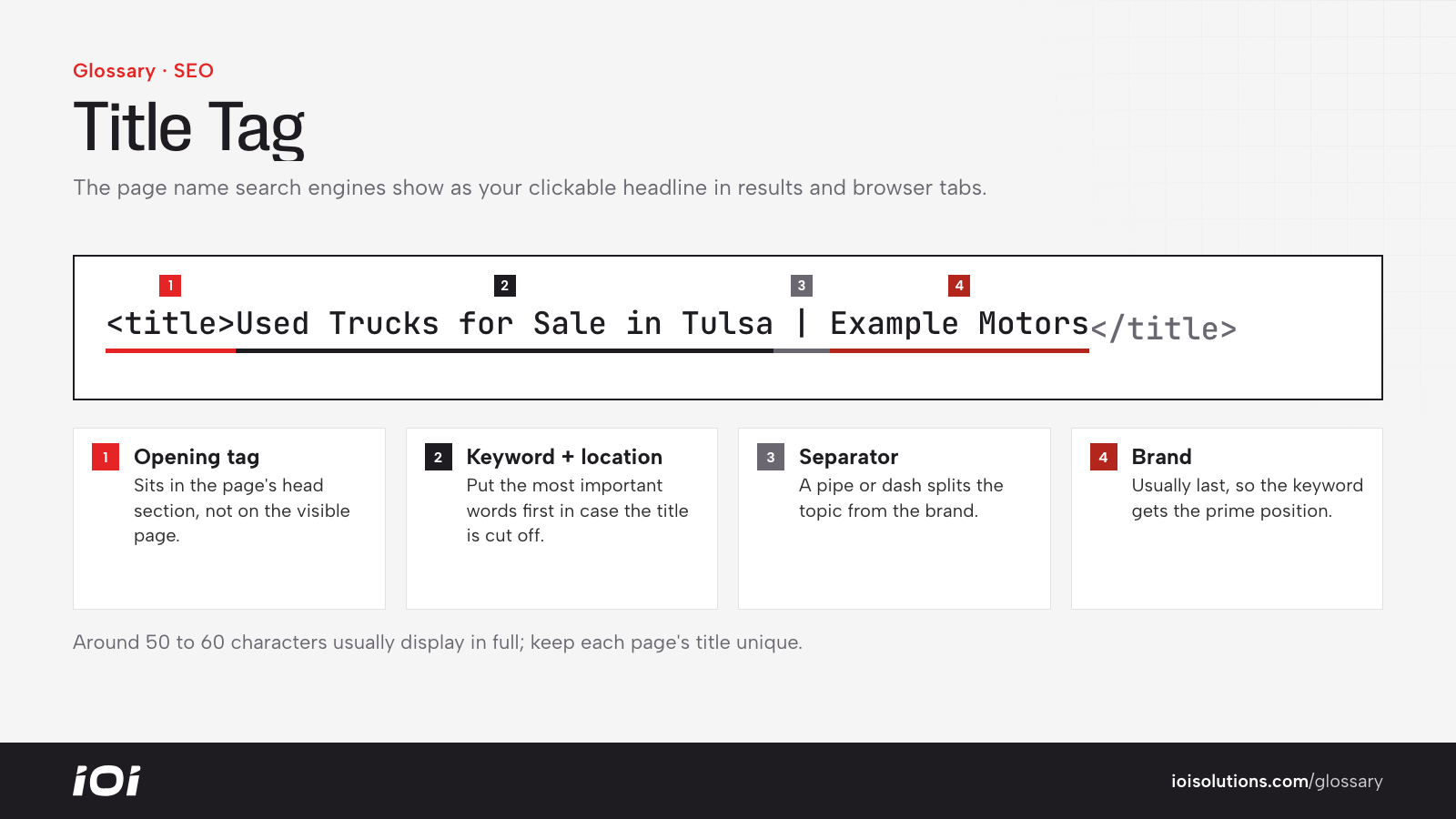
A title tag is an HTML element placed in the head section of a web page that tells browsers and search engines what the page is about. It looks like this in code: <title>Used Trucks for Sale in Tulsa | Example Motors</title>.
Visitors rarely see the title tag on the page itself. Instead, it appears as the blue clickable headline on the search engine results page, as the label on browser tabs and bookmarks, and often as the default headline when a page is shared on social media or cited by AI search tools.
Why the Title Tag Matters
The title tag does two jobs at once. First, it is one of the clearest relevance signals a search engine reads when deciding what a page should rank for. Second, it is the first piece of copy a searcher sees, so it heavily influences whether they click your result or a competitor’s.
- A well-written title helps the right page rank for the right query.
- A compelling title can lift organic click-through rate without any ranking change.
- Unique titles help search engines tell similar pages apart, reducing internal competition.
- Clear titles improve usability for people juggling many open tabs.
How a Title Tag Works
Search engines read the title tag when crawling a page and use it, along with other content, to understand the topic. When the page appears in results, the engine usually displays the title tag as the headline. However, Google may rewrite titles it considers too long, stuffed with keywords, vague or mismatched with the page content, often pulling text from the main heading instead.
Display space is limited by pixel width rather than a strict character count. As a rough guide, titles of around 50 to 60 characters usually display in full on desktop. Longer titles are truncated with an ellipsis, so the most important words should come first.
A common pattern is: Primary keyword or topic + modifier or benefit + brand name. For example, “Collision Repair in Plano, TX | Free Estimates | Example Body Shop.”
Title Tags in Automotive Marketing
Automotive websites often have thousands of pages generated from templates, which makes title tags both a big opportunity and a common problem.
- Dealership vehicle pages: Templates should build titles from year, make, model, trim, condition and location, such as “Used 2021 Ford F-150 XLT in Boise, ID.” Generic titles like “Vehicle Details” waste a valuable signal across the whole inventory.
- Inventory search pages: Filtered pages for “New Toyota RAV4 for Sale” or “Used SUVs Under $20,000” can rank well when their titles reflect the filter.
- Service pages: A repair shop’s brake service page should be titled for the service and city, not just “Services.”
- Multi-location businesses: Each location page needs its own title naming the city or neighborhood so pages do not compete with each other.
- Parts ecommerce: Product titles should include the part type, key fitment and brand, for example “Cold Air Intake for 2018 to 2023 Jeep Wrangler JL 3.6L.”
Title tags work together with the meta description. The title earns attention; the description supports the click with details like offers, hours or ratings.
Best Practices
- Write a unique title for every indexable page, and fix template defaults that repeat across hundreds of URLs.
- Put the main keyword or topic near the start, and keep the brand name at the end unless brand is the main draw.
- Aim for roughly 50 to 60 characters, focusing on what displays before truncation.
- Write for humans: be specific, add a reason to click, and avoid keyword stuffing.
- Match the title to the page content so search engines are less likely to rewrite it.
- Audit titles periodically with a crawler to catch missing, duplicate or overly long tags.